
👉Duplicate Invoice Templates
This month we’ve added another time-saving new feature to Pop Invoice: the ability to duplicate invoice templates.
What's New
You can now copy an existing template instead of starting from scratch, then adjust only what’s different.
Example
If your standard invoice template includes UK company details and VAT, but you also work with US clients, you can now duplicate that template, remove the tax, update payment details, and you’re ready to go.
How it works
1. Open your list of invoice templates in Pop Invoice.
2. Click on the 3 dots next to the template and select Duplicate.
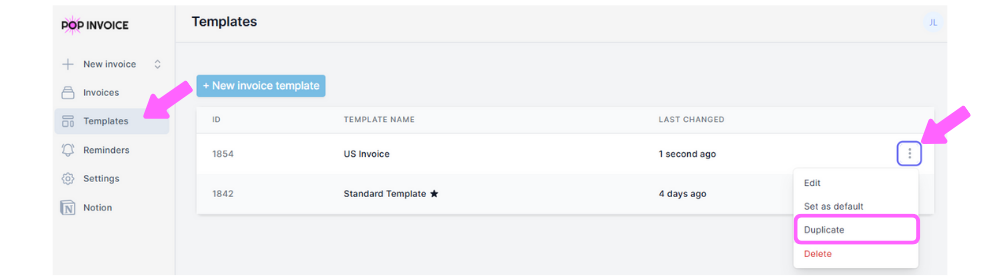
3. A new copy will appear with the same layout, fields, and branding.
4. Update details such as payment information, tax settings, or client-specific notes.
5. Rename and Save
❓Frequently Asked Questions
❔Does the duplicate include my branding and layout?
👉Yes, everything from the original template is copied, including your logo, colours, and layout.
❔Will edits to the duplicate affect the original template?
👉No. Each duplicated template is independent, so any changes you make won’t impact the original.
❔Is this available on all plans?
👉 No, The duplicate feature is available to only PRO Pop Invoice users. As FREE users can only have one
Thanks to everyone who suggested these improvements
Message Jo at jo@popinvoice.com with any questions or suggestions for new features
